

How to Classify Software Applications Components: Full Guide
When you’re documenting a system, running an architecture review, or triaging technical debt, “component” can mean different things depending on who’s asking. A procurement team wants to know what’s licensed versus homegrown. A DevOps engineer cares about what’s independently deployable. An architect cares about coupling. None of them are wrong. They’re using different classification lenses for different questions.
There’s no single correct taxonomy for software application components. The right one depends on the decision you’re trying to make. Below are the six classification schemes used in practice, followed by a method for applying them to your own system.
Classify by Architectural Layer
The most common starting point: where does the component sit in the flow of a request or a piece of data?
| Layer | Purpose | Typical Components |
|---|---|---|
| Presentation | User interaction and display | UI screens, forms, templates, views |
| Business logic | Core rules and processing | Services, controllers, validators, workflow engines |
| Data access | Talking to storage | Repositories, DAOs, ORMs, query builders |
| Data | Persistent storage itself | Databases, file stores, caches |
Layer-based classification is the default lens for architecture diagrams and onboarding docs, since it maps directly to how a request actually moves through the system.
Classify by Functional Responsibility
Within a layer, components split further by the job they do:
- UI components: buttons, forms, widgets, pages
- Controllers/handlers: route requests, coordinate logic
- Services: encapsulate business rules
- Models/entities: represent data structures
- Repositories: abstract data persistence
- Utilities/helpers: shared, stateless logic (formatting, validation, logging)
- Middleware: cross-cutting concerns (auth, logging, rate limiting)
This is the lens most code-review and refactoring conversations actually use, since it explains why a piece of code exists rather than just where it lives.
Classify by Origin
Useful whenever licensing, risk, or maintenance ownership is the question:
- Custom-built: developed in-house
- COTS (commercial off-the-shelf): purchased, vendor-maintained
- Open-source: third-party, community-maintained
- Legacy: older components kept alive, often wrapped
- Wrapped/adapted: legacy or external code exposed through a new interface
Security and license audits are usually organized around this dimension first, since it determines who patches a vulnerability and who owns the support contract.
Classify by Deployment Granularity
How the component is packaged and shipped:
- Module: a logical unit within one codebase
- Library/package: reusable code, linked statically or dynamically
- Service: independently deployable, as in a microservice
- Container: packaged with its own runtime
- Serverless function: event-triggered, ephemeral
This is the lens DevOps and platform teams reach for, since it determines the deployment pipeline a component needs.
Classify by Coupling and Reusability
Relevant when you’re deciding what’s safe to change or replace:
- Core/framework components: foundational, heavily depended on
- Plugin/extension components: optional, loosely coupled, swappable
- Shared/utility components: reused across multiple parts of the system
- Feature-specific components: tied to one use case, not meant for reuse
A tightly coupled core component and a loosely coupled plugin carry very different risk for the same size of change. That’s usually the deciding factor in a refactor-versus-rewrite call.
Classify by UML Component Stereotype
The formal classification from component-based software engineering, useful when producing UML diagrams or CBSE documentation:
- Executable components: deployable binaries or processes
- Data components: configuration files, data stores
- Deployment components: artifacts tied to a specific environment
- Work-product components: design or documentation artifacts that feed the build
Worked Example: Classifying an E-Commerce App’s Components
Take a small online store: a product page, a checkout flow, an order service, a payment integration, a database, and a recommendation feature. The same components look different depending on which lens you apply.
| Component | By Layer | By Origin | By Deployment Unit |
|---|---|---|---|
| Product Page UI | Presentation | Custom-built | Module in the frontend app |
| Checkout Controller | Business logic | Custom-built | Module in the backend |
| Order Service | Business logic | Custom-built | Independent service |
| Payment Gateway Wrapper | Business logic | Wrapped/adapted | Library |
| Stripe SDK | Business logic | COTS | Library |
| Recommendation Engine | Business logic | Custom-built | Serverless function |
| Auth Middleware | Business logic | Custom-built | Module |
| Order Repository | Data access | Custom-built | Module |
| PostgreSQL Database | Data | Open-source | Managed data store |
| Redis Cache | Data | Open-source | Container |
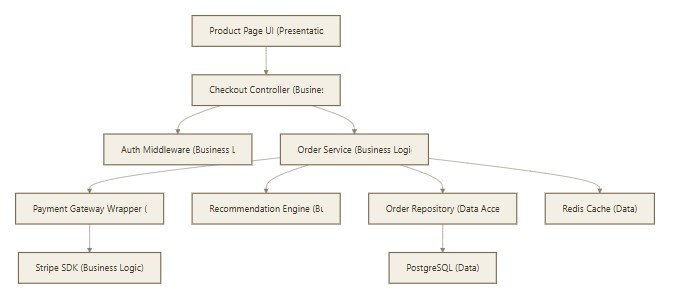
Notice the Payment Gateway Wrapper and the Stripe SDK sit in the same layer but have opposite origins: one is homegrown glue code, the other is a vendor library. A layer-only view would treat them as equivalent. An origin-only view would flag the Stripe SDK for a license review and leave the wrapper alone. Neither view is complete by itself, which is exactly why the lens has to match the question.
Here’s the same system as a layered flow, using these actual components:
How to Classify Software Application Components in Your Own System
Pick the lens that matches the question you’re answering, then work through your actual inventory:
- List every component: every service, module, library, and file group that could reasonably stand alone.
- Pick a primary lens: layer for architecture docs, origin for a license audit, deployment granularity for a DevOps migration.
- Tag each component once, using that lens only. Mixing lenses in one pass is what makes classification diagrams confusing. A component can be “business logic,” “open-source,” and “a plugin” at the same time, just not in the same column.
- Note the dependencies between components, not just their category. Two components in the same layer can still have very different coupling.
- Add a second lens only if a specific question needs it: layer for the architecture review, origin for the risk assessment that goes with it.
- Put it in a diagram or table your team will actually reference: a UML component diagram for architecture work, a spreadsheet for a license audit.
Which Classification Fits Your Situation
- Architecture review or onboarding docs → layer + functional responsibility
- Refactor or rewrite decision → coupling and reusability
- Security or license audit → origin
- DevOps or platform migration → deployment granularity
- Formal UML documentation → component stereotype
Most teams end up using two lenses side by side (one for how the system is organized, one for the specific decision at hand) rather than forcing everything into a single taxonomy. Start with the lens that answers your current question, and add a second one only when a new question actually requires it.
Our latest blog posts:
